General
Best v0 Alternatives for AI UI (2026)
A practitioner's look at the strongest v0 alternatives, where each one wins, and which tool fits mobile app UI versus web, with prices and plans compared side by side.
TL;DR: For designing mobile app interfaces, the best v0 alternative is TapUI: describe the app in a sentence and get up to 8 matching mobile screens, ready to paste into Figma as editable layers or hand to developers as HTML and PNGs. Plans start at $20/month ($17/month billed yearly). v0 itself is web-only (React and Next.js; free with 7 messages a day, Plus $30/user/month). If you want a working web app instead of designs, use Bolt (Pro $25/month) or Lovable. For a visual Flutter app builder, use FlutterFlow. For free mobile and web ideation, try Google Stitch.
v0 by Vercel does one thing very well: you type a prompt and get React and Next.js components you can drop into a project and deploy in a click. Millions of developers use it. People still search for alternatives, usually for one of three reasons.
Cost. v0 bills by usage, and the free plan's 7 messages a day go quickly on anything non-trivial. Heavy users find monthly costs hard to predict.
Reliability. Some users reported weaker output during 2025, such as broken imports and layouts, which made results less predictable.
Platform. This is the big one. v0 is web-only. If you are designing a mobile app, meaning real iOS or Android screens rather than a responsive web page, v0 was never built for you. Neither were most "v0 alternatives", which are web tools competing on v0's home ground.
This guide groups the alternatives by what they are for. If you are here because v0 cannot design phone screens, skip to the mobile section.
v0 alternatives at a glance
| Tool | Best for | Native mobile UI? | Free plan | Paid from |
|---|---|---|---|---|
| TapUI | Mobile app screens from a sentence | ✅ | No | $20/mo ($17/mo yearly) |
| v0 | React/Next.js web components | ❌ | 7 messages/day | Plus $30/user/mo |
| Bolt | Full-stack web apps from a prompt | ❌ | 300K tokens/day | Pro $25/mo |
| Lovable | Web MVPs, fast | ❌ | Yes | see site |
| Google Stitch | Free web + mobile ideation | ⚠️ Labs | Free (Google Labs) | No paid plan published |
| Uizard | Wireframes for non-designers | ⚠️ mockups | 2 projects | $12/mo billed yearly |
| FlutterFlow | Visual Flutter app building | ✅ (Flutter) | Yes | see site |
| Framer / Builder.io / TeleportHQ | Marketing and CMS-driven web | ❌ | Varies | Varies |
| Anima | Flutter / React Native export from Figma | ⚠️ export only | n/a | Paid plans |
What v0 is good at
v0's real strength is how tightly it fits the Vercel ecosystem. It runs several model tiers (Mini, Pro and Max), includes a code editor with Git integration, connects to databases such as Snowflake and AWS, previews your app in a live sandbox, and deploys to Vercel in one click. An agent mode handles longer, multi-step builds.
If your destination is a React or Next.js app on Vercel, most alternatives below will feel like a step down on integration. The reasons to leave are cost, uneven output, or, most often, that you are not building for the web at all.
Pricing: a free plan with 7 messages a day, Plus at $30 per user a month, Business at $100 per user a month, and custom Enterprise. Everything is usage-based, which people either like (pay for what you use) or dislike (hard to predict).
Full-stack web builders: Bolt and Lovable
Bolt and Lovable go further than v0 in one way: they build the whole stack from a single prompt, not just components. If your goal is to ship a working web app, that matters.
Bolt, from StackBlitz, runs entirely in your browser: frontend, backend and database, with no local setup. It generates full-stack web apps and puts heavy emphasis on fixing its own errors, which cuts down the loops that slow other prompt-driven builders. The free plan includes 300K tokens a day, and Pro is $25 a month. Token use scales with project size, so costs climb on large projects, which is the most common complaint.
- Best for: a deployable full-stack web app from one prompt, with no local setup.
- Pros: runs in the browser; full stack in one pass; strong automatic debugging.
- Cons: costs climb on large projects; web only, no mobile UI.
Lovable works the same way: describe an app and get editable source code for the whole thing. It is fast at taking an MVP from idea to deployed. It has a free plan with daily credits and paid plans above it.
- Best for: getting a web MVP live quickly.
- Pros: real, editable source code; fast across the full app lifecycle.
- Cons: web apps only, no native iOS or Android UI.
Where these beat v0 is scope: v0 gives you components, while Bolt and Lovable give you a running application with a backend. Where they do not help is mobile. Both build web apps only.
Design-focused generators: Google Stitch and Uizard
These tools give you screens to think with, not code to deploy.
Google Stitch is Google's design-focused option. Older lists mention Galileo AI; treat those as history and compare against Stitch's current documentation. Stitch takes text and voice prompts, design files and codebases, and lets you iterate live on a canvas. Google names AI Studio, Antigravity and Netlify as handoff and publishing paths.
- Best for: live visual ideation connected to Google's developer tools.
- Pros: several input modes, a live canvas, Google and web handoff, free in Google Labs.
- Cons: a Labs experiment with no service guarantee; no deployment or backend.
Stitch is a Labs project, and Google has a history of retiring those. For fast ideation on a budget it is excellent. For something you are betting a roadmap on, plan for it to change.
Uizard focuses on AI mockups and wireframes for non-designers and early founders. Its Autodesigner builds multi-screen mockups from a prompt. The free plan covers 2 projects, and Pro is $12 a month billed yearly. It is a good way to get a concept across, but it stays at the mockup level and is not built specifically for mobile.
- Best for: non-designers who want a quick, wireframe-level concept.
- Pros: multi-screen mockups from a prompt; low price.
- Cons: mockups only, no production code; not mobile-specific.
Web-only tools: Framer, Builder.io, TeleportHQ, Dora
These solve problems next to v0's. They are useful for specific web jobs, but none designs mobile apps.
- Framer AI is a no-code builder for marketing websites. Excellent for landing pages, not for app UI.
- Builder.io combines a visual headless CMS with AI code generation, including Figma-to-code and a Fusion feature that turns Slack or Jira messages into pull requests. Strong for web teams with a CMS. No mobile UI.
- TeleportHQ is a low-code website builder with AI generation and Figma-to-code for React, Next.js, Vue, Angular, Gatsby and plain HTML/CSS. It has no Flutter, React Native or native mobile export.
- Dora AI generates animated 3D websites from prompts. Striking, but a niche of its own and not app UI.
If you are building for the web, one of these may fit better than v0. If you are building for a phone, none of them will.
The mobile gap, and where TapUI fits
The clear gap in this market is native mobile app UI from a plain-text prompt, and TapUI is built for exactly that. Look at the pattern: v0 is web-only, the full-stack builders are web, the design generators lean web (Stitch covers mobile screens as a Labs experiment), and the rest are websites.
Describe the app in plain language, pick a visual direction, and TapUI builds up to 8 connected mobile screens on one design system. Where v0 gives you React for the browser, TapUI gives you phone screens: paste them into Figma as editable layers, copy the HTML, or download PNGs with no watermark, then hand them to your developers.
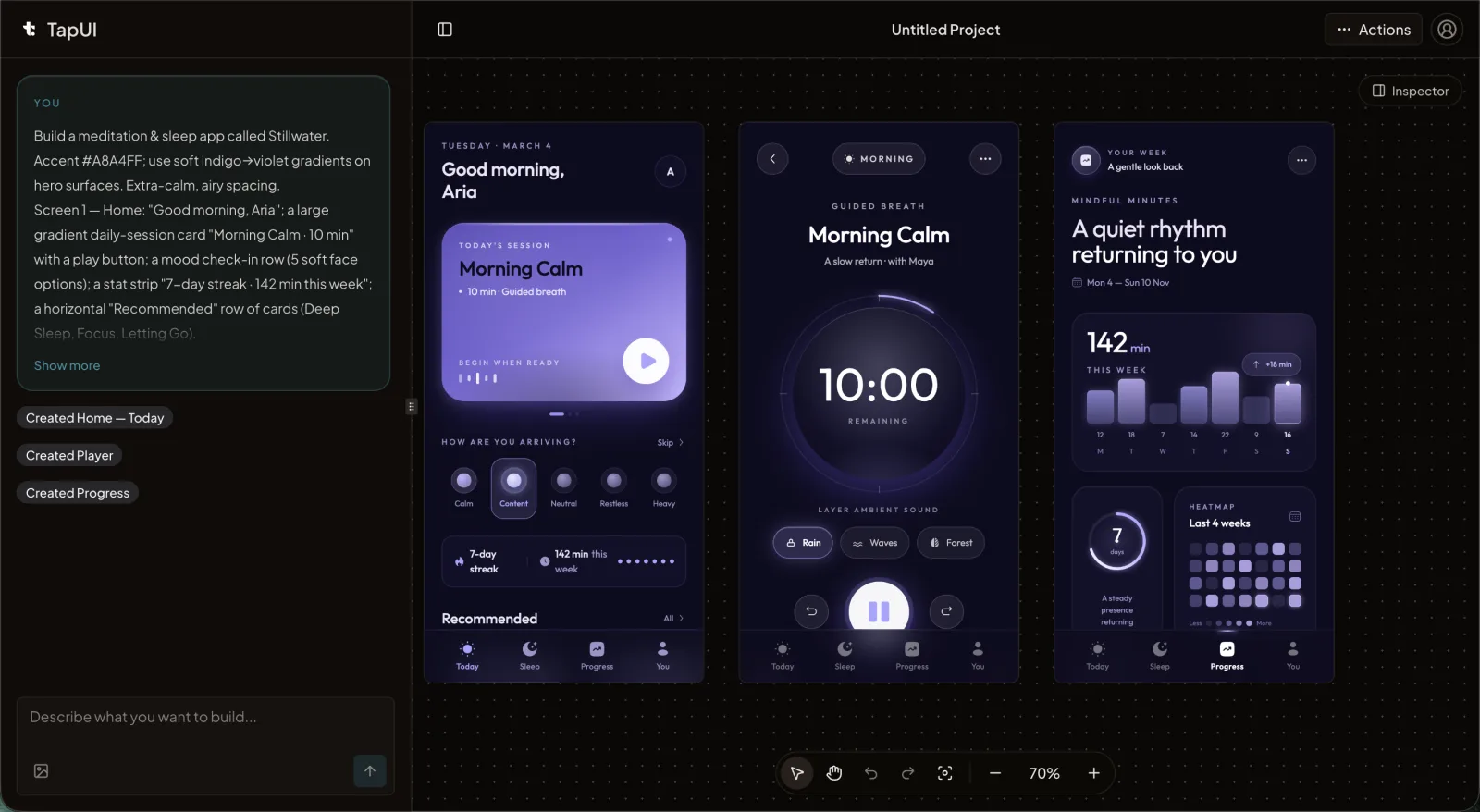 The TapUI editor: describe an app in plain language and get matching mobile screens to hand to your developers.
Pricing: Starter is $20/month ($17/month billed yearly) for 100 screen generations and email support. Pro is $40/month ($27/month billed yearly) for 650 and priority support. There is no free plan.
- Best for: turning a sentence into a full mobile flow without designing by hand.
- Pros: mobile-only focus; up to 8 matching screens per prompt; Figma, HTML and PNG export; from $17/month billed yearly.
- Cons: HTML export but no native app code, and no backend.
When another tool fits better:
- You need a deployed web app: use Bolt or Lovable.
- You need React components for a Next.js site: stay with v0.
- You want free mobile and web ideation: Google Stitch is free in Google Labs.
- You need Flutter or React Native code from a design: look at Anima, which takes a Figma file rather than a prompt.
- You want to build a Flutter app visually: FlutterFlow is a drag-and-drop Flutter app builder. Many teams design the flow in TapUI first, then build it in FlutterFlow or code.
A note on code editors
Cursor is an AI code editor, not a UI generator. It appears on some "v0 alternative" lists, but it helps you edit code you already have. It does not generate UI from a prompt.
Which one should you pick?
Match the tool to where the work ends up:
- A mobile app interface from a plain-text prompt: TapUI, with up to 8 matching screens per prompt, from $20/month ($17/month billed yearly).
- React or Next.js components hosted on Vercel: v0. Leave only if cost or output quality pushes you out.
- A full web app with a backend from one prompt: Bolt or Lovable. Watch Bolt's token costs on large projects.
- Free ideation across web and mobile: Google Stitch, knowing it is a Labs product.
- Quick wireframes for non-designers: Uizard.
- Marketing or CMS-driven websites: Framer, Builder.io or TeleportHQ.
- Flutter or React Native code from an existing design: Anima.
There is no single best v0 alternative, because v0 is not one thing to everyone. Mobile design from a prompt is the least crowded corner, and TapUI is the clear answer there. For the web, Bolt, Lovable and v0 itself are mature options: choose by whether you need components, a full stack or tight Vercel integration.
FAQ
Can v0 generate native mobile app UI?
No. v0 generates React and Next.js code that runs in a browser, with no Flutter, React Native or native iOS and Android output. For mobile app screens, use a mobile-focused tool such as TapUI, or Anima for code from a Figma design.
Should I treat Galileo AI as a current alternative?
No. Treat older Galileo AI recommendations as history and evaluate Google's current Stitch product directly.
What's the best free alternative to v0?
Google Stitch is free in Google Labs, v0's own free plan allows 7 messages a day, and Uizard's covers 2 projects. For mobile app screens, TapUI has no free plan but starts at $17/month billed yearly, less than v0 Plus at $30/user/month.
Should I choose Bolt or Lovable for a web MVP?
Both build full-stack web apps from a prompt. Lovable is fast across the whole app lifecycle, while Bolt runs entirely in the browser and is strong at fixing its own errors. Bolt's token costs grow on larger projects, so factor that in.
Which tool exports Flutter or React Native?
Anima is one of the few tools that exports Flutter and React Native, but it needs a Figma design as input rather than a text prompt. Most prompt-based generators, including v0 and TapUI, do not export native code. TapUI produces mobile screens your developers build from.
How does TapUI compare to v0?
v0 generates React and Next.js code for the web. TapUI generates mobile app screens from a sentence, up to 8 per prompt on one design system, and exports them to Figma, HTML and PNG. v0 Plus is $30/user/month; TapUI Starter is $20/month. Use v0 for a Next.js site and TapUI for a phone app's UI.
What is the best v0 alternative for mobile app design?
TapUI. v0 does not design native mobile screens, while TapUI builds up to 8 matching mobile screens from one prompt and exports them to Figma as editable layers. For a Flutter app builder, choose FlutterFlow; for free ideation, Google Stitch.
Designing a mobile app? Start with TapUI and get your first screens from one sentence.
Related: Best AI UI generators • Design app UI with AI