General
The Best AI Design Tools for Agencies in 2026
A practitioner's look at the AI design tools agencies use in 2026 (Stitch, Figma AI, Uizard, Visily, TapUI) and which one fits each client workflow in practice.
TL;DR: For agencies that need polished mobile app screens from a plain-text brief, fast enough to show a client the same day, TapUI is the best pick: up to 8 matching screens per prompt, exported to Figma, HTML or PNG, from $20/month ($17/month billed yearly). For free, broad web and mobile exploration with Figma export, Google Stitch is the strongest no-cost option. For non-designers mocking something up, Uizard and Visily have the gentlest learning curve. For ongoing product work and the best developer handoff, Figma AI is the standard. When finished designs need to become code, Locofy handles the conversion. Most agencies run a small stack: a generator for speed, Figma for depth.
Picture a typical agency week: three pitches due Friday, a client who wants to "see options" before committing budget, and a designer out sick. What wins the pitch is not the polished final file. It is a convincing version of the idea, made fast enough that the client can react to it in the room.
That is the real job AI design tools do for agencies. They do not replace designers, and nobody can honestly promise a fixed speed-up. They shorten the distance between a brief and something a client can respond to. No single tool covers that whole distance, and vendor marketing rarely says where each one stops being useful.
This guide maps the tools as they stand in 2026: what each does well, where it falls short, and how they fit together.
The tools at a glance
| Tool | Best for | Key strength | Figma/code export | Notes |
|---|---|---|---|---|
| TapUI | Polished mobile app screens for client pitches | Up to 8 matching screens per prompt | ✅ Figma layers, HTML, PNG; no native code | Starter $20/mo; Pro $40/mo |
| Google Stitch | Live exploration and pitch variations | Voice, design-file and codebase input | ✅ Google/web handoff | Free in Google Labs |
| Uizard | Non-designers mocking something up | Gentlest learning curve; screenshot-to-design | ⚠️ Limited exports | Free (2 projects); Pro $12/mo yearly |
| Visily | Fast wireframes, idea-to-flow speed | Clean screenshot to wireframe to Figma | ✅ Figma | Free (300 AI credits/mo); Pro $14/editor/mo |
| Figma (AI) | Product work, design systems, handoff | Industry standard; best developer handoff | ✅ Best in class | Steep learning curve; AI credits run out fast |
| Locofy | Turning finished designs into code | Broad framework support, including React Native | ✅ Code out | ❌ Not a generator; needs high-fidelity input |
Three jobs that get lumped together
"AI design tool" covers three jobs, and most agency disappointment comes from buying a tool built for one and expecting another:
- Generating UI screens from a description. You type or sketch an idea and get app or web screens back. TapUI, Uizard, Visily and Google Stitch do this.
- AI inside a professional design environment. The AI assists, but the work happens on a mature canvas with components, variables and collaboration. This is Figma AI.
- Turning finished designs into code. A handoff problem, not a generation problem. This is Locofy.
Text-to-UI generators: describe it, get screens
TapUI
Best for: polished mobile app screens to put in front of a client early, before a designer commits real hours.
TapUI turns a plain-text description into polished mobile app screens that look presentable rather than rough. That is a different emphasis from Visily's wireframe-first approach or Stitch's broad but generic output. Describe the app, pick a visual direction, and TapUI builds up to 8 connected screens on one design system, so a pitch flow looks like one product. Rewrite any single element, then paste the screens into Figma as editable layers, copy the HTML, or download PNGs with no watermark.
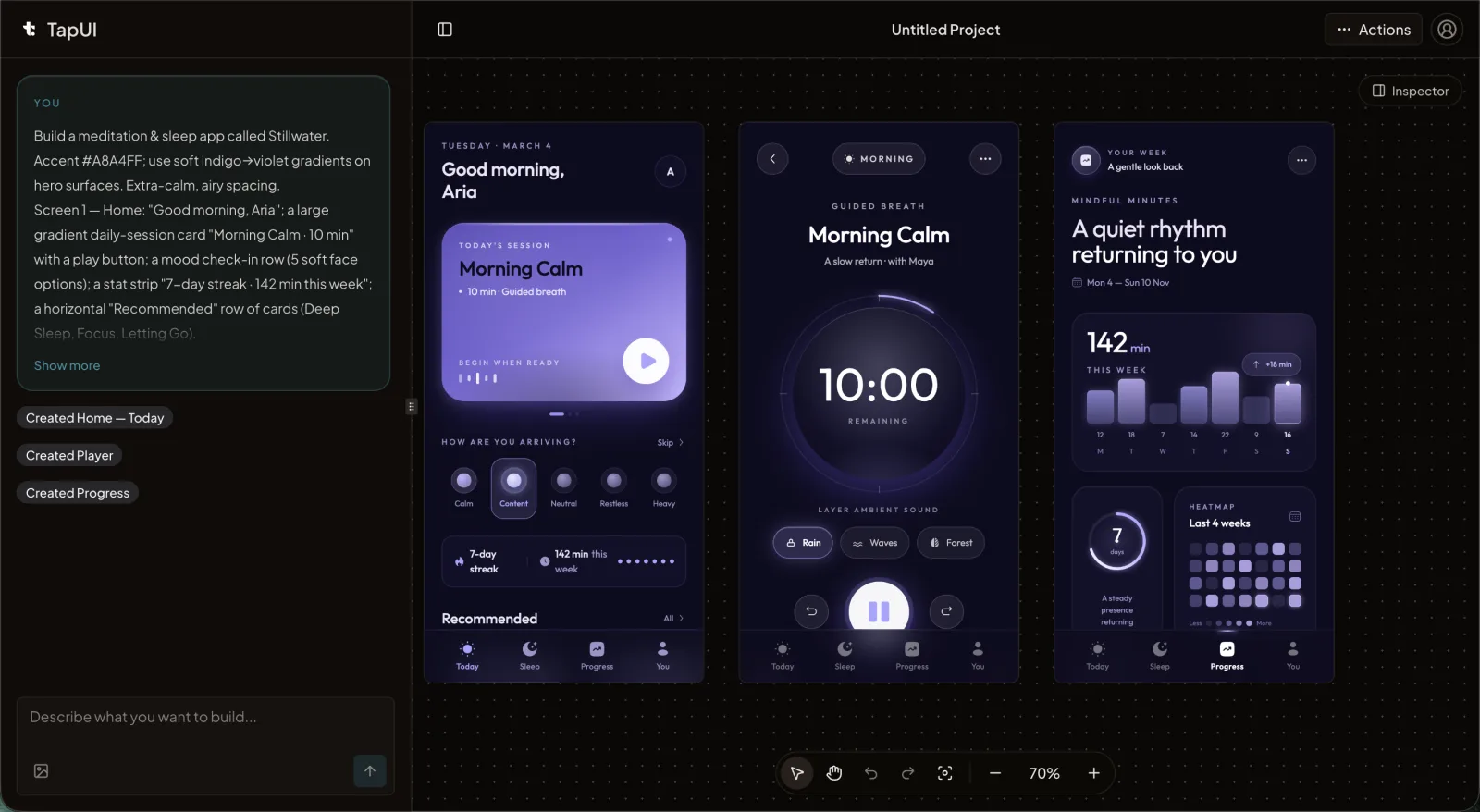 The TapUI editor turns a plain-text app description into presentable mobile UI screens.
Pricing: Starter is $20/month ($17/month billed yearly) for 100 screen generations, project history, exports and email support. Pro is $40/month ($27/month billed yearly) for 650 and priority support. There is no free plan.
Pros: mobile-focused output that is most useful early in an engagement: presentable app screens for a pitch, or something concrete for a client to react to. Pastes straight into Figma when the designer takes over.
Cons: mobile app UI only, and no native code. TapUI exports designs (Figma, HTML, PNG), not React Native, Swift or Flutter, so do not promise a client native code out of the tool.
Google Stitch
Best for: free, high-volume exploration when you need many variations fast.
Stitch runs in Google Labs. Google documents text and voice prompts, input from design files and codebases, live work on a canvas, shareable links through Google AI Studio, and handoff to Antigravity or Netlify. Treat older Galileo AI articles as history; Google's current Stitch documentation is the source to use.
Pros: several input modes and fast, steerable exploration, useful for presenting multiple directions to a client. Free.
Cons: output tends to be generic, "a modern app" rather than this client's brand. Coherence slips past three or four screens as flows drift. The Figma export exists but produces loosely structured layers that a designer has to clean up. Strategically, it is a Labs experiment with no committed roadmap or enterprise pricing, so it could change or close with little notice.
Uizard
Best for: account managers, PMs and other non-designers who need to mock something up without pulling in a designer.
Uizard has the gentlest learning curve on this list. It is built for speed and for non-designers, not for fine control. Miro bought it in 2024, and it still runs under its own brand. Autodesigner turns a text prompt into a multi-screen project, and its best trick is screenshot-to-design: give it a screenshot and it rebuilds an editable version. It also does sketch-to-wireframe and AI heatmaps that predict where attention lands.
Pros: screenshot-to-design is excellent for "make something like this, but ours."
Cons: design precision is well below Figma. It is not where you build a production design system, export options are limited, and AI generations are capped on the free and lower plans, which matters when you iterate heavily on a pitch.
Visily
Best for: teams without dedicated design expertise who need a clean flow fast.
Visily is about time to first flow: you get from idea to wireframe quickly, and the screenshot to wireframe to Figma path is clean. It offers screenshot-to-wireframe, AI UI generation and Figma export. The free plan includes 300 AI credits a month, and Pro is $14 per editor a month.
Cons: like Uizard, it is not built for advanced visual design or production-ready components. It gives you a structured starting point, not a finished deliverable.
Figma AI: the professional standard
Best for: ongoing product work, building and maintaining design systems, and the best developer handoff.
For agencies doing ongoing product work, Figma is the center of gravity, and its AI features work differently from the generators above. Figma AI is not a "describe it and walk away" tool. It is AI inside the environment where the design work happens.
The pieces to know: First Draft turns a prompt into wireframes and mockups; Figma Make is an AI app builder that takes an idea toward production inside Figma; and Code-to-Canvas turns pasted React, HTML or SwiftUI into an editable Figma component. There are also AI descriptions in Dev Mode, AI layer renaming, and integrations with GitHub Copilot and Cursor.
Pros: the industry standard, with near-universal adoption in large companies, thousands of plugins, real-time collaboration and the best developer handoff available. If your agency builds and maintains design systems for clients, Figma is the floor.
Cons: a steep learning curve, which is why simpler generators exist. AI runs on credits that go quickly on lower plans, and agentic features like Figma Make use variable amounts. Costs grow with team size. First Draft can produce basic app wireframes, but it is a generalist, not a mobile-first generator.
So the realistic pattern is not "Figma or a generator." It is both: generate fast in a text-to-UI tool, then bring the chosen direction into Figma to finish it. TapUI's Figma paste makes that step a copy and paste.
Handoff and adjacent tools
These appear on "best AI design tool" lists but solve different problems:
- Locofy is design-to-code, not design generation. It turns existing high-fidelity Figma, Penpot or Adobe XD files into frontend code across many frameworks, including React Native for mobile. It needs finished designs and is developer-facing, so it belongs after the design phase.
- Framer AI generates live, publishable websites, not mobile app screens. Good for a fast marketing site, wrong for app design.
- Adobe Firefly generates images and assets inside Creative Cloud. It is trained on licensed content, which makes it commercially safe for graphics, but it does not generate UI screens or components.
If a client needs the app shipped, Locofy bridges design and code. If they need a website live this afternoon, Framer. If they need imagery, Firefly. None replaces a UI generator.
How to choose: match the moment
- Polished mobile app screens to show a client early: TapUI, from $17/month billed yearly. Designs only, no native code.
- Free exploration with many variations for a pitch: Google Stitch, accepting generic output and platform risk.
- A non-designer mocking something up: Uizard or Visily; screenshot-to-design is the standout.
- Product work, design systems and the best handoff: Figma with its AI features. Everything ends up here eventually.
- Finished designs that need to become code: Locofy, with broad framework support but a need for high-fidelity input.
Start with TapUI when the deliverable is mobile app UI and speed matters; its narrow focus is why its output is more presentable than a generalist's. Move into Figma once the direction is locked and the craft work begins. The agencies getting the most from AI do not standardize on one product. They use a generator to compress the front of the process, where speed wins pitches and spares designers speculative work, and Figma where craft and maintainability matter. AI is good at the first draft. People still decide which draft is right.
How to introduce AI design tools without burning the team
Two things go wrong most often.
Treating generated output as finished work. Every tool here produces a starting point. The generated screen is the cheap part; deciding whether it is the right screen is the expensive part, and that still belongs to a designer. Budget for cleanup, especially with Stitch's loosely structured Figma exports.
Over-promising to clients. Do not sell speed you cannot reliably hit, and do not claim capabilities the tool lacks. Telling a client they will get native code from a design generator will come back to bite you. Position AI accurately: it lets your team spend less time on production busywork and more on strategy and creative direction. That benefit is real, and it holds up.
FAQ
What is the best AI design tool for agencies?
For mobile app work, TapUI: up to 8 polished, matching screens per prompt that you can show a client the same day and paste into Figma, from $20/month ($17/month billed yearly). Most agencies pair it with Figma for finishing and handoff, and use Locofy when designs need to become code.
Will AI design tools replace designers at agencies?
No. They automate the repetitive front of the process (first drafts, variations, layout starting points), but they do not make creative or strategic decisions or manage clients. Agencies doing well with AI use it to free designers for higher-value work.
What's the difference between TapUI, Uizard and Visily?
All three generate UI from a description, but they lean different ways. Uizard and Visily focus on fast wireframes with gentle learning curves and have free plans; Uizard's screenshot-to-design is a particular strength. TapUI focuses on polished mobile app screens ready for client pitches, with Figma, HTML and PNG export, and is paid only.
Should an agency evaluate Galileo AI separately?
No. Treat older Galileo AI references as history and evaluate Google's current Stitch product on its present documentation and output.
Can TapUI export native code?
No. TapUI exports designs (Figma layers, HTML and PNG) for your developers, not React Native, Swift or Flutter code. For code, Locofy is built for the job, and Figma offers strong developer handoff inside the design environment.
How much does TapUI cost?
TapUI has no free plan. Starter is $20/month ($17/month billed yearly) for 100 screen generations, project history, exports and email support. Pro is $40/month ($27/month billed yearly) for 650 and priority support.