General
Expo UI Design with AI (2026)
Create polished Expo app UI mockups with AI, compare design and code tools, and export screens to Figma, HTML, or PNG for a smoother developer handoff.
TL;DR: TapUI is the best AI tool for designing an Expo app's UI before you build it. Describe the app and it creates up to 8 matching mobile screens on one design system, which you can refine and export to Figma, HTML or PNG. Plans start at $20/month ($17/month billed yearly). TapUI does not generate an Expo or React Native app: once the design is approved, a developer builds it in Expo, or uses a code-first builder such as RapidNative or Rork, or an AI coding agent inside the project.
Expo is not a design product. It is the React Native framework you use to ship to iOS, Android and the web. So when people look for an AI design tool "for Expo," they usually mean one of two jobs, and the right tool depends on which one.
Job one: mockups. You want to explore a polished, on-brand UI before committing development time. TapUI serves this stage by generating editable mobile screens for review and handoff.
Job two: running code. You want components wired into Expo Router that you can preview on a device and keep building on.
No single tool does both well. This guide covers the tools worth knowing in 2026, where each one is strong, and where it falls short.
At a glance: the tools compared
| Tool | Category | Best for | Output | Pricing |
|---|---|---|---|---|
| TapUI | AI mockup tool | Expo UI planning, validation and handoff | Up to 8 screens per prompt; Figma, HTML, PNG | Starter $20/mo; Pro $40/mo |
| Google Stitch | Design-first | Live, conversational visual exploration | Design and prototype output | Free (Google Labs) |
| RapidNative | Code-first | React Native project generation | React Native or Expo project | Free (20 AI credits/mo); Starter $20/mo |
| Rork | Code-first | Prompt-to-mobile-app workflow | Mobile app project | See vendor |
| Expo agent tooling | Code-first | Agents working in your own Expo repository | Code in your repository | Depends on the agent |
How the tools divide
AI tools around Expo fall into two groups. Mockup and design tools turn a prompt into a high-fidelity UI a team can review and refine; TapUI and Google Stitch belong here. Code-first builders turn a prompt into an actual React Native and Expo project; RapidNative, Rork and a0.dev belong here.
Expo's own approach is not a standalone product. Expo documents skills, an MCP server and project context files that help coding agents such as Codex, Claude Code and Cursor work accurately inside an Expo repository. That route keeps the code and architecture in your project rather than handing them to a separate generator.
Each group supports a different stage. Mockup tools help a team settle hierarchy, content and visual direction before development. Code-first tools start the implementation and should be judged on architecture, dependencies and device behavior.
TapUI: Expo app mockups before implementation
TapUI turns a text prompt into polished mobile screens for an Expo app.
It is built for founders, product managers and designers who need credible mockups without doing layout work by hand. They use the screens to validate a flow, align stakeholders and give Expo developers a clear visual direction.
Describe the app, pick a visual direction, and TapUI builds up to 8 connected screens on one design system. Rewrite any single element, then paste the screens into Figma as editable layers, copy the HTML, or download PNGs (one at a time or as a ZIP), with no watermark.
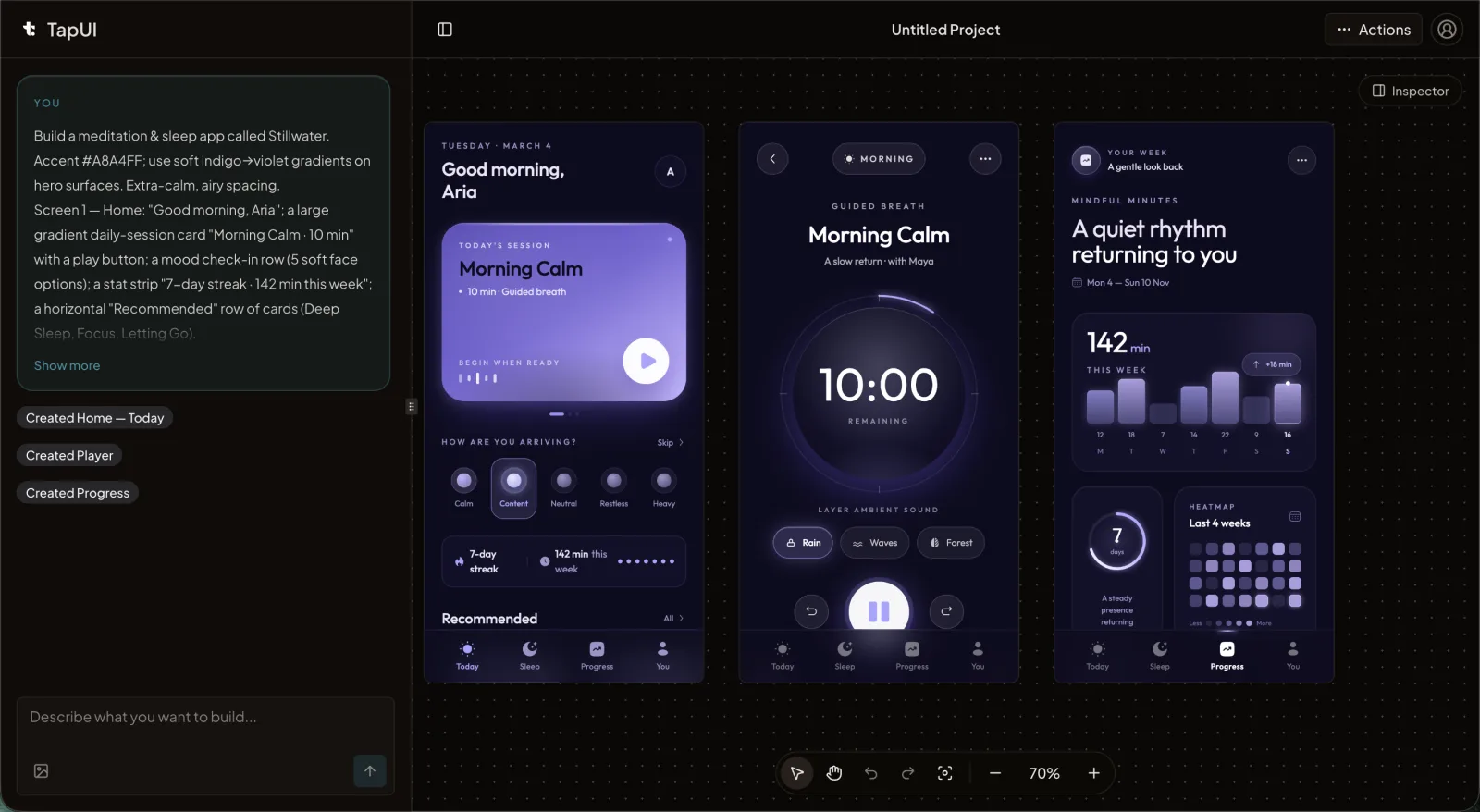 The TapUI editor: describe an Expo app in plain text and generate editable mobile UI mockups for validation and handoff.
Pricing: Starter is $20/month ($17/month billed yearly) for 100 screen generations, project history, exports and email support. Pro is $40/month ($27/month billed yearly) for 650 and priority support. There is no free plan.
- Best for: founders, PMs and designers who need credible Expo app mockups to validate, pitch or brief a developer.
- Output: editable mobile screens with Figma, HTML, PNG and ZIP export.
- Handoff: TapUI does not generate an Expo or React Native app. Developers build the chosen screens with the project's components, navigation, state and data.
TapUI fits at the start of an Expo workflow: generate and refine the screens, agree on the interface, then build that direction in the real repository. Pair it with a code-first builder or an AI coding agent when you are ready to create the project.
Google Stitch: visual exploration, not Expo code
Stitch supports live visual exploration, but Google's documentation does not list React Native or Expo export. It accepts text and voice prompts, design files and existing codebases, streams work to a canvas, and hands projects to Google AI Studio or Antigravity. That helps settle a direction, but an Expo team still has to build or adapt the result in React Native.
- Best for: conversational exploration before a separate Expo build.
- Pros: several input types, live iteration, links into Google's developer tools, free in Google Labs.
- Cons: no documented React Native or Expo export; limits are shown in the product.
RapidNative and Rork: when you want code, not mockups
If your goal is a running Expo app, RapidNative and Rork are built for it.
RapidNative generates React Native projects with Expo-oriented output. It has a free plan with 20 AI credits a month, Starter at $20 a month and Pro at $49 a month. Before adopting it, generate a realistic flow and check the Expo SDK version, navigation approach, dependencies, and whether you can export and maintain the full project.
- Best for: generating a real Expo project with explicit SDK versions, NativeWind and Figma input.
- Pros: React Native code, full project export, several input modes.
- Cons: you inherit its architecture and styling choices.
Rork is a prompt-to-mobile-app builder. Treat its output like any generated codebase: check source access, repository integration, navigation, data handling, dependencies and device behavior in the current product.
- Best for: full-app generation with GitHub export.
- Pros: complete app scaffold, real source export, GitHub integration.
- Cons: credits do not roll over; reshaping the output takes real work; Rork Max is Apple-only.
Both produce working projects. The trade-off is the usual one with code generators: you inherit their architecture and styling, and reshaping a generated project to fit your conventions takes time. a0.dev, backed by Y Combinator, also generates React Native and Expo apps with a Convex or Supabase backend if you want the backend included.
How to choose
Ask one question: what do I need to walk away with?
- Mockups to review and hand off: TapUI for polished mobile screens, or Stitch for broader, free exploration.
- A running Expo project: a code-first builder. RapidNative for explicit Expo SDK, NativeWind and Figma input; Rork for full-app generation with GitHub export.
- Code that stays in your own Expo repository: a coding agent using Expo's documented skills, MCP server and project context.
A practical Expo workflow
There is no single winner, because designing screens and building the app produce different artifacts.
If your bottleneck is getting to polished mockups without manual design work, TapUI is built for that stage. Describe the app, refine the screens, and export the approved UI to Figma, HTML or PNG. Implementation continues in your development stack.
A common sequence: TapUI for mockups, stakeholder review and visual decisions, then development in the real repository, often with RapidNative, Rork or a coding agent to scaffold the code. Code-first builders combine more of those stages, so judge their generated repository, not just the preview.
FAQ
Which AI design tool is best for Expo apps?
For designing the UI, TapUI: up to 8 matching mobile screens per prompt with Figma, HTML and PNG export, from $20/month ($17/month billed yearly). For runnable code, use a coding agent inside your Expo repository or evaluate a code-first builder such as RapidNative or Rork.
Does Google Stitch export React Native or Expo code?
Google's documentation does not list React Native or Expo export. Use Stitch for exploration, then build the chosen direction in your Expo repository.
What does TapUI create for Expo teams?
Editable mobile app mockups for planning, validation and developer handoff, exported to Figma, HTML, PNG or a ZIP of every screen. TapUI does not generate an Expo or React Native app; developers build the approved screens in the project.
How much does TapUI cost?
TapUI has no free plan. Starter is $20/month ($17/month billed yearly) for 100 screen generations, project history, exports and email support. Pro is $40/month ($27/month billed yearly) for 650 and priority support.
Can I use more than one AI tool together?
Yes, and many teams do. A common pattern is a design tool (TapUI or Stitch) to lock the visual design, then a code-first builder (RapidNative or Rork) or a coding agent to scaffold the Expo implementation.