General
The Best AI Design Tools for iOS App UI in 2026
A practitioner's comparison of AI tools for designing iOS app screens fast, with clear trade-offs on Stitch, Uizard, Visily, Figma and TapUI, plus prices and Figma export.
TL;DR: TapUI is the best AI tool for generating iOS app screens you can take into Figma. Describe the app in a sentence, get up to 8 matching iPhone screens on one design system, then paste them into Figma as editable layers (or copy the HTML, or download PNGs). Plans start at $20/month ($17/month billed yearly). Other options: UX Pilot and Figma's own AI work inside Figma, Visily (free Starter, 300 AI credits a month) exports to Figma on paid plans, Uizard turns sketches into designs, and Google Stitch is free in Google Labs with Figma export.
Search for "AI design tool" and you get three very different products in one list: prompt-to-UI generators, design-to-code converters, and design apps with an AI feature added. They are not interchangeable, and picking the wrong kind is the quickest way to lose a weekend.
This guide covers one job: getting from an idea to a polished iPhone screen you can show people. Each tool is judged on how close its screens look to a real iPhone app, how cleanly they get into Figma, and what it costs.
Related: For other platforms, see our guides to Android UI, Flutter and React Native with Expo.
The tools at a glance
| Tool | Best for | Gets into Figma how | Free plan | Paid from |
|---|---|---|---|---|
| TapUI | iPhone screens from a sentence | Paste as editable layers; also HTML, PNG | ❌ No | $20/mo ($17/mo yearly) |
| Google Stitch | Free visual exploration | Figma export | ✅ Free (Google Labs) | No paid plan published |
| Figma (AI) | Refining inside Figma | Already in Figma | ✅ Starter, up to 500 AI credits/mo | $16/mo full seat |
| Visily | Team collaboration | Figma export on paid plans | ✅ 300 AI credits/mo | $14/editor/mo |
| Uizard | Sketch or screenshot input | Image/PDF export | ✅ 2 projects | $12/mo billed yearly |
| Locofy | Figma to code | Starts from Figma | n/a | see site |
First, pick the right kind of tool
- Prompt-to-UI generators turn a plain-text description into screens. Start here if you have nothing yet. TapUI, Google Stitch, Uizard and Visily belong in this group.
- Design-to-code tools turn an existing design file into frontend code. Locofy is the clearest example. They cannot help until you have a finished design.
- Design apps with AI features, such as Figma, use AI to assist a manual workflow rather than drive it.
Lists in this category age fast. Treat older recommendations for Galileo AI or discontinued products as history, and check each vendor's current documentation before you commit to a workflow.
Google Stitch: the free option
Best for: turning a vague idea into wireframes you can react to, at no cost.
Stitch comes from Google Labs and runs on Google's Gemini models. Give it a prompt, a sketch or a reference image, and it generates multi-screen mobile and web layouts on an infinite canvas, linked into a rough user journey. It exports editable layers to Figma and code in several frameworks, and it offers an MCP integration for people who work in an editor like Cursor.
It is free in Google Labs, with a daily allowance shown in the product.
Pros: costs nothing; strong at multi-screen flows; fast from idea to wireframe.
Cons: output often looks generic and leans toward Material Design rather than iOS; no brand identity out of the box, so you still need a polish pass; as a Labs product, its future is not guaranteed.
Uizard and Visily: capable, but not iOS-first
Both are proven UI tools. For this guide, their limit is that neither is built mobile-first, so iOS fidelity is not their focus.
Uizard: best for turning sketches and screenshots into editable designs. Miro bought Uizard in 2024. It is strongest when your input is not text: a photo of a whiteboard becomes an editable design in seconds, and screenshot-to-design works well too. Autodesigner builds a multi-screen prototype from a prompt. It supports mobile, tablet and desktop viewports and offers developer handoff.
- Pros: excellent sketch and screenshot input; multiple viewports; developer handoff.
- Cons: small free plan (2 projects) that runs out fast; web-only tool; output usually needs a trip through Figma to look polished.
Visily: best for mixed teams designing together in one file. Visily targets non-designers and teams, with a large template library, text-to-screen and screenshot conversion, real-time collaboration on a shared canvas, and built-in diagramming.
- Pros: useful free plan (300 AI credits a month); strong real-time collaboration; large template library.
- Cons: not mobile-first; iOS fidelity is not its focus.
Figma: where designs finish, not where they start
Best for: refining generated screens and handing off to developers.
Figma is a manual design tool with AI added, not a generator. Features like First Draft can create layouts and components from a prompt, alongside visual search and auto-layout help. If you want AI to do most of the work, though, Figma is an awkward fit, and the learning curve is real.
- Pros: the industry standard; almost every tool here exports to it; where teams meet to review.
- Cons: AI assists rather than generates; steep learning curve for non-designers.
Most teams generate screens elsewhere, then refine and hand off in Figma.
Locofy: a different job
Best for: converting an existing design into production frontend code.
Locofy appears in these searches, so it is worth a clear line. It converts an existing Figma or Penpot design into frontend code across many frameworks. For turning a finished iOS design into code, it is excellent.
- Pros: strong design-to-code; wide framework support; built for developers.
- Cons: not a UI generator; needs a finished design; aimed at developers rather than designers.
If you want to describe an app and get screens, Locofy is the wrong category.
Where TapUI fits
Best for: going from a plain-text app idea to iPhone screens in Figma without drawing them yourself.
Describe the app in one sentence and pick a visual direction. TapUI plans the flow, then builds up to 8 connected screens on one design system, so onboarding, home and settings match. Attach a reference image if you have a look in mind, and rewrite any single element without regenerating the screen.
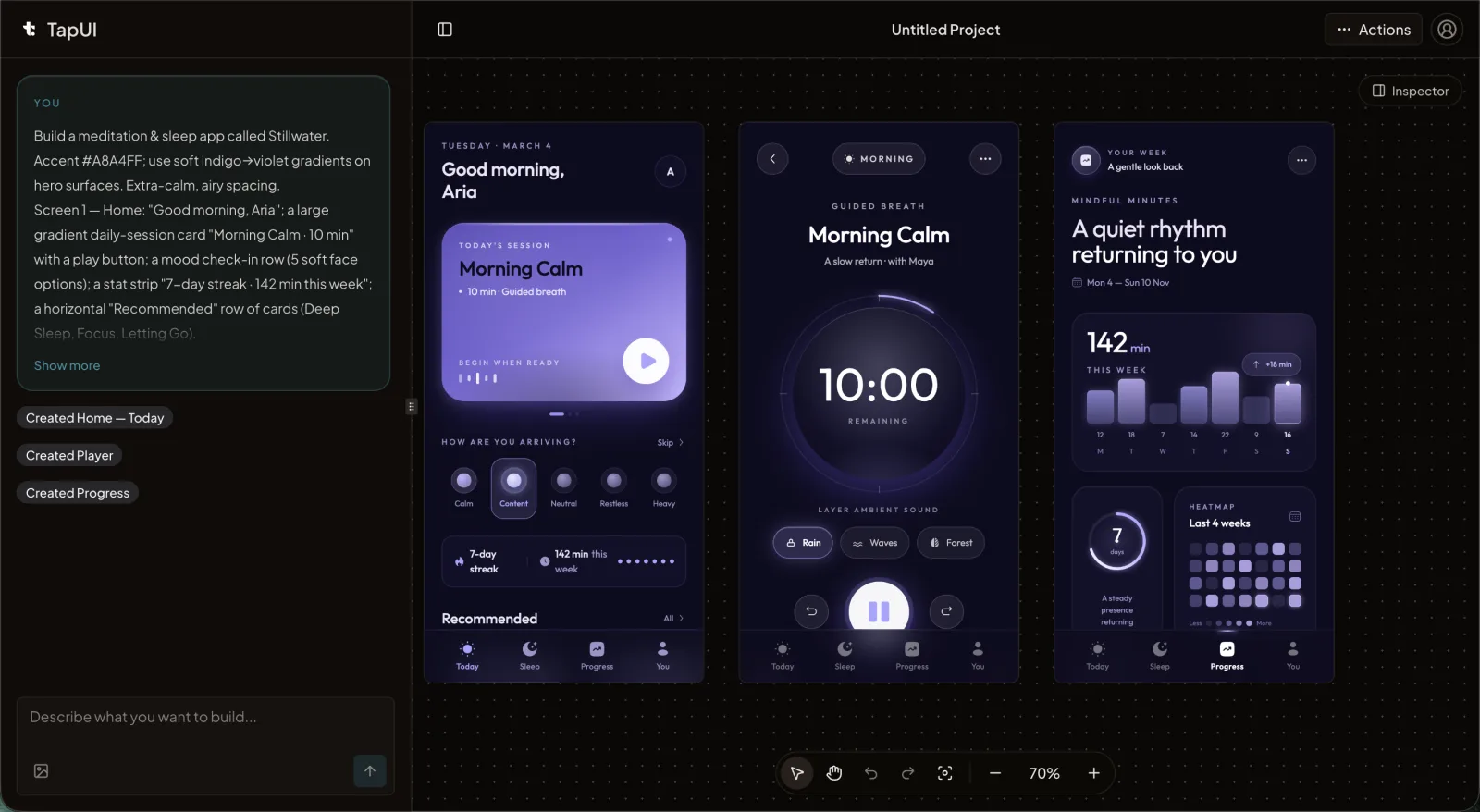 The TapUI editor turns a plain-text app description into matching iPhone screens.
Getting the screens into Figma takes one step: copy a screen and paste it onto your canvas as native, editable layers. You can also copy the HTML for a developer or download PNGs, one at a time or as a ZIP, with no watermark.
Pricing: Starter is $20/month ($17/month billed yearly) for 100 screen generations and email support. Pro is $40/month ($27/month billed yearly) for 650 and priority support. There is no free plan.
- Pros: up to 8 matching iPhone screens per prompt; pastes into Figma as editable layers; no watermark; from $17/month billed yearly.
- Cons: mobile only; no Swift or SwiftUI export; sketch-to-design conversion is Uizard's specialty, not TapUI's.
If you only need free throwaway wireframes, Stitch costs nothing. To turn a whiteboard photo into a design, use Uizard. If your bottleneck is team collaboration, look at Visily. TapUI is the right choice when you want finished-looking iPhone screens in Figma from the start.
How to choose
- Free, fast wireframes, polish later: Google Stitch.
- A sketch or screenshot to turn into a design: Uizard.
- A mixed team designing together in one file: Visily.
- Polished iPhone screens from a text description, ready for Figma: TapUI.
- A finished design that needs code: Locofy.
- Final refinement and handoff: Figma.
The costly mistake is choosing a tool for a job it was not built for. A wireframe generator gives you wireframes, and a code converter needs a design first. Decide which problem you are solving before you open a tab.
FAQ
Which AI tools generate iOS app screens you can export to Figma?
TapUI generates up to 8 iPhone screens from a text prompt and pastes them into Figma as editable layers, from $20/month ($17/month billed yearly). Google Stitch (free in Google Labs) also exports to Figma, Visily exports to Figma on paid plans ($14/editor/month), and UX Pilot and Figma's own AI work inside Figma itself.
Can an AI design tool replace a designer or developer?
No. These tools shorten the path from idea to screen, but someone still makes product decisions, refines the result and builds the app. The value is skipping the blank canvas and repetitive layout work.
What's the cheapest way to try these tools?
Google Stitch is free in Google Labs, Uizard (2 projects) and Visily (300 AI credits a month) have free plans, and Figma's Starter plan includes up to 500 AI credits a month. TapUI has no free plan; it starts at $17/month billed yearly ($20 monthly) and includes Figma export.
Can TapUI export React Native, Swift, or Flutter code?
No. TapUI designs mobile screens that your developers build from. It exports to Figma, HTML and PNG, not native code. If you need design-to-code conversion, use a tool like Locofy once the design is final.
Why would I use TapUI instead of just using Figma?
Because TapUI designs the screens for you and Figma does not. Describe the app, get up to 8 matching screens, then paste them into Figma as editable layers to refine and hand off. Figma is where you finish; TapUI gets you there without a blank frame.
How much does TapUI cost?
TapUI Starter is $20/month ($17/month billed yearly) for 100 screen generations a month with email support. Pro is $40/month ($27/month billed yearly) for 650 with priority support. There is no free plan.
How polished is AI-generated output?
It depends on the tool. Wireframe generators like Stitch produce fast but generic layouts. Finished-screen tools like TapUI get much closer to presentable, but you should still review and refine before shipping. Treat any first generation as a strong draft.
The short version
If you want iPhone screens from a plain-text description and you want them in Figma, TapUI is built for exactly that: up to 8 matching screens per prompt, pasted into Figma as editable layers. Start with TapUI and generate your first flow.
For other jobs: Stitch for free, fast wireframes; Uizard for sketch and screenshot input; Visily for team collaboration; Figma to refine and hand off.